Connect Snug to ChatGPT
You can add Snug to ChatGPT as a custom connector, so ChatGPT can read and update your planner directly.
Requirements
Custom connectors are available on ChatGPT Plus, Pro, Business, Enterprise, and Edu plans. You'll also need Developer Mode enabled to allow write actions (adding and updating tasks, not just reading). The exact wording and menu locations in ChatGPT change from time to time, so if a label below doesn't match exactly, look for the nearest equivalent.
1. Generate your API key
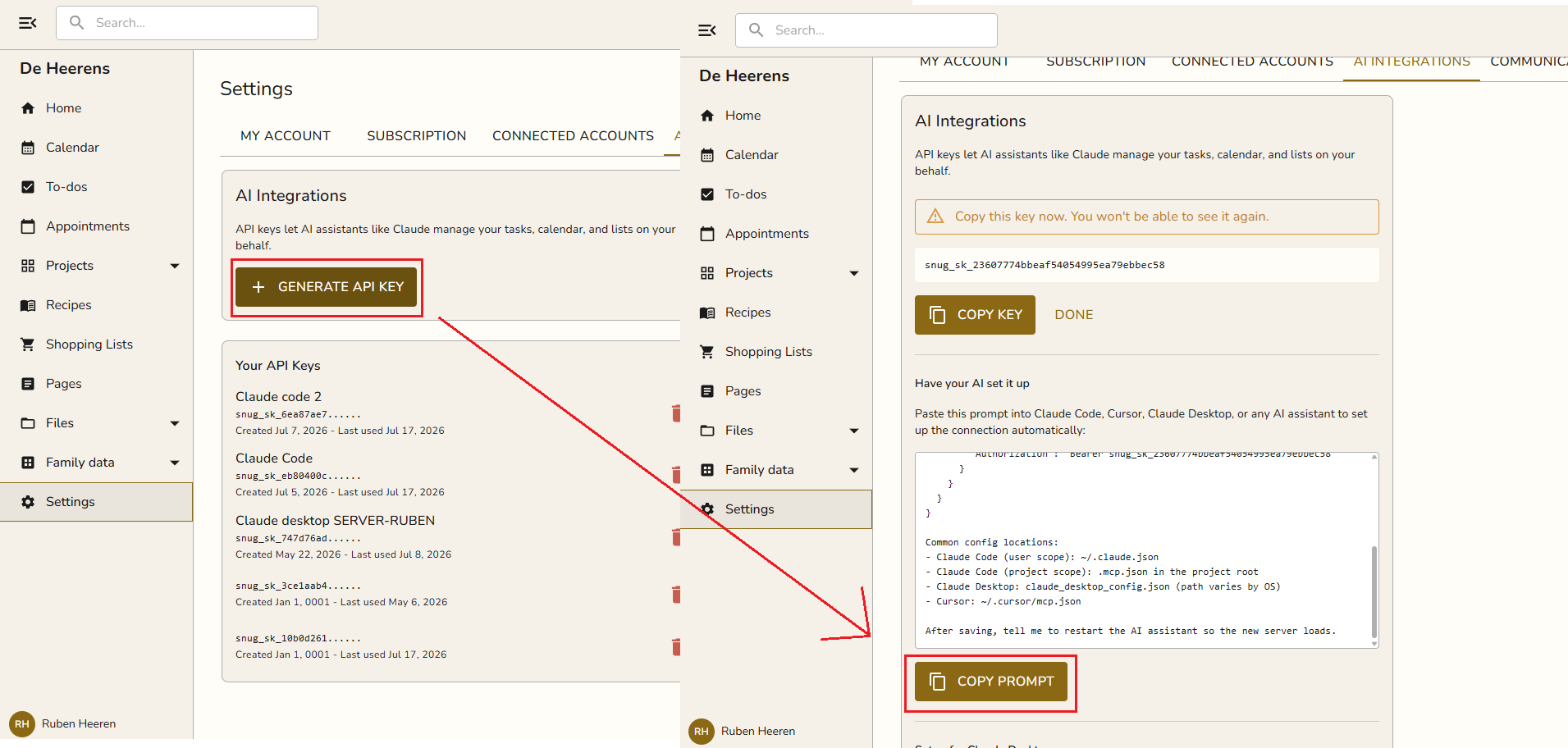
- Open Snug and go to Settings → AI Integration.
- Click Generate API key, name it (e.g. "ChatGPT"), and click Add.
- Click Copy key. It starts with
snug_sk_and is shown only once.
Note
ChatGPT is set up through its Connectors screen, not by pasting a prompt, so use the Copy key button here (not Copy prompt) and follow the steps below.
2. Enable Developer Mode
- In ChatGPT, go to Settings → Connectors (also called Apps & Connectors).
- Open Advanced and turn on Developer Mode. This lets connectors use write actions, not just read.
3. Add Snug as a connector
- On the Connectors screen, click Create (or Add custom connector).
-
Fill in:
- Name:
Snug - MCP server URL:
https://api.snugplanner.com/mcp - Authentication: choose the API key / custom header option and enter your key as a Bearer token:
Authorization: Bearer snug_sk_YOUR_KEY_HEREIf ChatGPT only asks for the key value (not a full header), paste
snug_sk_YOUR_KEY_HEREand set the scheme to Bearer. 3. Save. ChatGPT will connect and load the Snug tools. - Name:
4. Use it in a chat
Start a new chat, and in the message composer enable the Snug connector (via the + / tools menu). Then ask:
What projects do I have in Snug?
ChatGPT will call Snug and list your projects.
Example prompts
- Plan our week. "Look at my Snug calendar and open tasks, then suggest a plan for the week and add the tasks you recommend."
- Triage my board. "Go through the Todo column of my Home Renovation project and flag anything overdue or missing a due date."
- Recipe to groceries. "Add all the ingredients from my Lasagna recipe to the Groceries shopping list."
- Email to tasks. "Here's an email from school. Create a task for every action item in my Back to School project." (paste the email)
- Meal plan. "Plan next week's dinners from my saved recipes and build a shopping list for it."
- Quick capture. "Add a task to call the plumber tomorrow morning and save the plumber as a contact."
See it in action
Read the walkthrough: Run your family planner with ChatGPT.
Troubleshooting
| Problem | Fix |
|---|---|
| Snug doesn't appear as a tool | Make sure Developer Mode is on and the connector is enabled in the chat's tools menu. |
| "Invalid API key" | Regenerate the key in Settings → AI Integration and update the connector. |
| Only read actions work | Write actions need Developer Mode. Confirm it's enabled under Connectors → Advanced. |
Prefer Claude? See Connect Snug to Claude. Still stuck? Email [email protected].